

English
QuickWeb my.Studio.Link
QuickWeb is an alternative way to bring a guest into the studio or the show. The guest gets a link that opens in any browser. Guests don't need any software.
Requirements
- A my.studio.link account with the STANDARD or PRO plan
- Studio Link standalone or plug-in version v21.07.0 or newer (only for you, not for other guests)
- For the guest: a web browser, also on a smartphone (iOS, Android) or on ChromeOS
Preparation in my.studio.link (podcaster)
- Register Studio Link standalone or plug-in with a wish name at my.studio.link
- The QuickWeb link is shown at my.studio.link/clients in the QuickWeb Link column, e.g.
https://my.studio.link/quick/<wishname> - Send the link to your guests
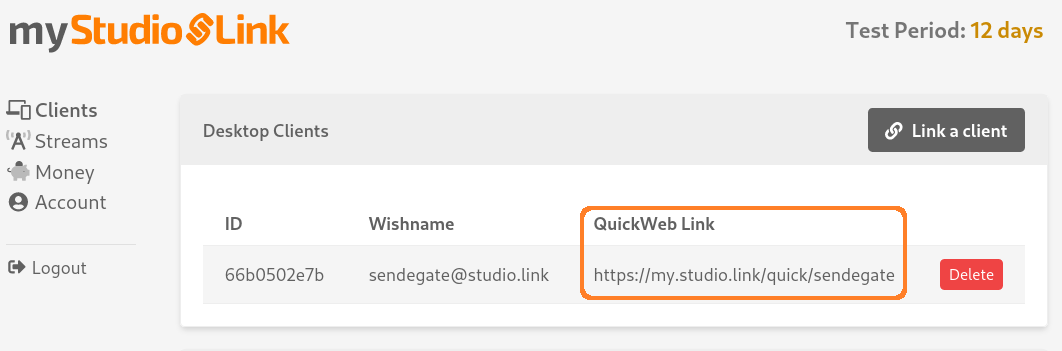
The link always stays the same, can be used many times, and one link is enough for all guests. If an error message shows up instead of the link, your plan is not sufficient or your Studio Link version is too old.
Joining in the browser (guest)
- Open the link in the browser
- Enter a name and press Next
- Select the headset (allow microphone access in the browser)
- Use the echo test to check that microphone and headphones work
- Press Call when you are ready
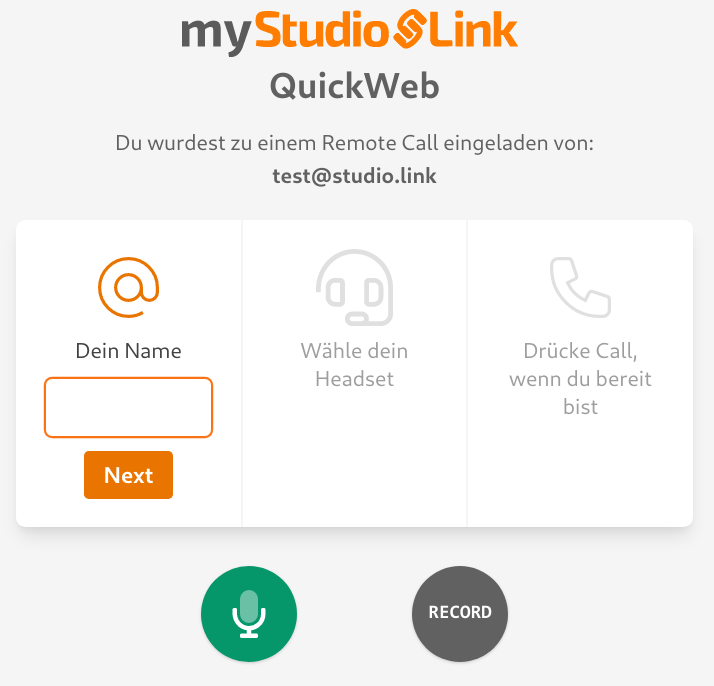
With Record the browser also makes a local backup recording (Opus, .ogg or .webm depending on the browser). After stopping, the recording is downloaded to the downloads folder.
TIP
Guests too: with headphones there are no echo problems and the audio quality is much better.
Smartphone
Stop the backup recording before closing the browser, otherwise it is lost (e.g. on iOS Safari).
Call and recording (podcaster)
QuickWeb guests behave like any other guest: they show up in Studio Link as quick-NAME@studio.link (NAME is the name the guest entered) and each gets their own track.
General recording steps: Quick start Standalone
